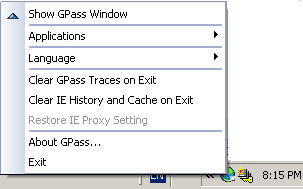
GPass has a tray icon in the Windows task bar (the area where the Windows clock is shown). You can double click the icon to bring back the GPass main window, or right click it to bring up the GPass menu shown on the left.
If GPass cannot find a usable tunnel, the tray icon
appears gray ( ), otherwise it
appears green (
), otherwise it
appears green ( ). When GPass is
actively sending or receiving packets, its tray icon lights up
(
). When GPass is
actively sending or receiving packets, its tray icon lights up
( ).
).